


An Azure cost anomaly is an unexpected jump or drift in your Microsoft Azure spending that does not match normal usage patterns. The trouble is that these spikes rarely announce themselves. By the time the invoice arrives, a forgotten resource, a runaway process or a misconfigured setting may have been burning money for days or weeks.
Cloud makes it easy to create things and just as easy to forget them. A single change on a Tuesday afternoon can quietly turn into a four-figure line on next month’s bill. This guide explains why each Azure cost anomaly slips past teams, what it costs, and how cloud administrators, architects and finance partners across Australia can catch problems early.
| Quick answer
An Azure cost anomaly goes unnoticed because cost data arrives with a delay, budgets only warn about totals, usage-based services scale silently and nobody owns the resource that changed. To catch it early, tag every resource, set budgets with alerts, review cost analysis often and automate responses to unusual spend. |
What Is an Azure Cost Anomaly?
An Azure cost anomaly is a change in spend that is significantly different from what your usage history would predict. It might be a sudden spike, such as a one-day jump after a deployment, or a slow upward drift that never trips a simple threshold. Both matter, but the slow drift is often harder to catch.
Microsoft’s Cost Management tools exist to help you see and analyse this kind of change. Microsoft explains how to investigate surprises in its guide to analysing unexpected charges. The tools are useful, but only when someone is looking at them and knows what normal looks like.
The Azure Cost Anomaly Problem: A Story Many Cloud Teams Recognise
Picture a Melbourne retail company with a lively online store. A developer wants better visibility into a slow checkout page, so she turns on very detailed diagnostic logging for the application. It is a sensible request and a one-minute change.
Traffic is busy that week. Log volume climbs far beyond what anyone expected, and the monitoring workspace starts ingesting data at a much higher rate. The finance team has a monthly budget alert, but it only fires when the total reaches a set percentage. That moment arrives late in the month. By then, most of the damage is done.
Nobody did anything reckless. The change was reasonable, the budget existed and the data was available. The gap sat between those pieces. (This scenario is an illustration, not a real case.) It is the same kind of quiet failure we explore in The Azure Quota Surprise and The Azure Policy Drift Problem, where a cloud environment slowly moves away from what the team believes it is.
Why an Azure Cost Anomaly Goes Unnoticed
These are the most common reasons cloud spending spikes before anyone notices.
1. Cost data is not instant
Cost and usage data can take several hours, and sometimes longer, to appear in reports. A runaway resource can spend a lot of money in that window, so a spike on Monday may not be visible until Tuesday.
2. Budgets warn about totals, not shape
A budget alert tells you when cumulative spend reaches a threshold. It does not tell you that Thursday’s spend was five times higher than Wednesday’s. Learn how budgets work in Microsoft’s tutorial on creating and managing budgets, and remember that by default a budget alert notifies but does not stop spending.
3. Usage-based services scale silently
Some Azure services charge by volume, such as log ingestion, storage transactions, data transfer and serverless executions. When usage grows, the bill grows with it, and nothing breaks, so nobody notices.
4. Autoscale and runaway processes
Autoscale is a great feature, but a poorly tuned rule or a bug that triggers endless retries can scale resources up and keep them there. A loop in a function or a pipeline stuck in a retry cycle can generate a huge number of billable operations.
5. Orphaned and forgotten resources
Deleting a virtual machine does not always delete its disks, public IP addresses or snapshots. These leftovers keep charging month after month and are easy to miss because they belong to no one.
6. Dev and test environments left running
Test environments are often built big, used briefly and never turned off. Multiply that by several teams and subscriptions and the quiet cost becomes substantial.
7. Compromised credentials and unauthorised workloads
A leaked key or weak account can let someone else spin up expensive compute in your subscription. A sudden, unexplained cost spike is sometimes the first visible sign of a security incident, which is why cost monitoring and security work belong together.
8. AI and data workloads with variable pricing
Analytics clusters, AI services and large data jobs can consume a lot very quickly, especially when usage is billed by volume or time. A pilot that was cheap in testing can become expensive at scale.
9. Missing tags and unclear ownership
When resources are not tagged, nobody can say who created them or why they exist. An Azure cost anomaly in an untagged resource group can sit unexamined for weeks because no one feels responsible.
Cause-and-Fix Cheat Sheet for Azure Cost Anomaly Alerts
Use this table to match what you see on the bill with the likely cause and a first fix.
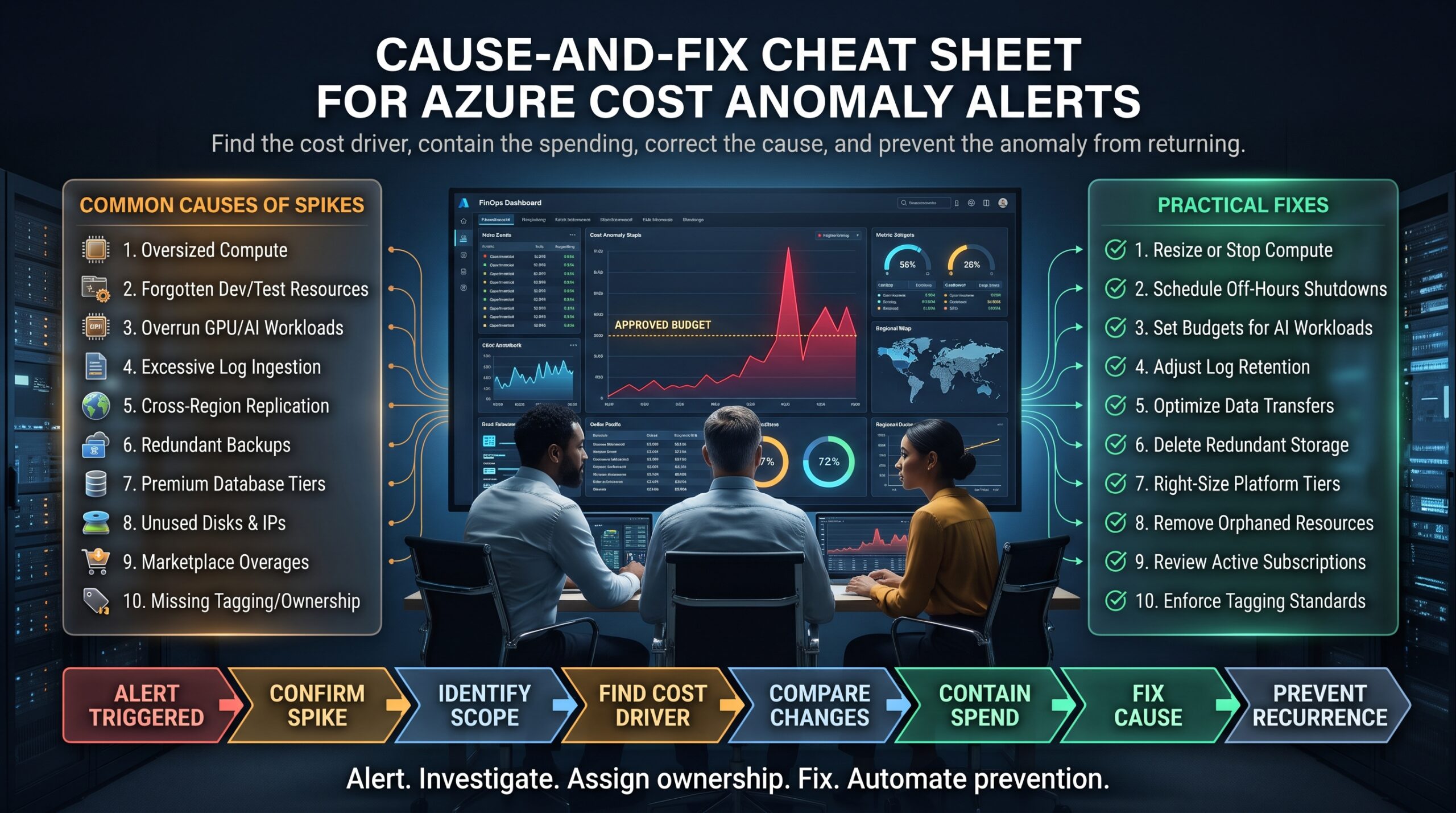
| What you notice | Likely cause | Quick fix |
| Sudden one-day spike | Runaway process, scale-out or logging change | Check cost analysis by resource and review recent deployments |
| Slow monthly drift upward | Usage growth or forgotten resources | Review by service and tag; remove unused items |
| Charges for deleted workloads | Orphaned disks, IPs or snapshots | Audit and delete unattached resources |
| Unknown resource group costs | No tags, no owner | Enforce required tags with policy and assign owners |
| Unusual compute in odd regions | Possible compromised credentials | Investigate immediately with your security team |
| Budget alert arrives too late | Alert only on total spend | Add earlier thresholds and daily cost checks |
What an Unnoticed Azure Cost Anomaly Really Costs
Direct financial waste
The obvious cost of an Azure cost anomaly is the money itself. Even a modest daily overspend adds up over a month, and the waste is often unrecoverable.
Strained trust between IT and finance
An unexplained Azure cost anomaly creates awkward conversations. Finance feels blindsided, engineering feels blamed and cloud projects become harder to fund.
Slower innovation
Once leadership has been burned by one Azure cost anomaly, they tighten approvals for everything. Good projects wait longer because the process now assumes the worst.
Hidden security risk
Because a spike can signal misuse, ignoring it can also mean ignoring a breach. Teams that link cost alerts with security alerts catch problems faster.
Career and capability gaps
Cost awareness is now part of cloud competence. As we discuss in Why Job Security Is Being Replaced by Skill Security, the professionals who understand cost as well as configuration are the ones who stay valuable.
How to Detect an Azure Cost Anomaly: A Seven-Step Routine
You can start this week using the tools already in your subscription. Work through these steps in order.
- Open cost analysis and look at the daily view. Monthly totals hide every Azure cost anomaly. Switch to daily costs and look for sudden jumps or slow climbs.
- Group by service, resource group and tag. Identify which service or team is driving the change.
- Compare against a normal period. Look at the same days last week or last month to judge whether the change is real.
- Check recent deployments and changes. Ask what was released, resized, enabled or scaled near the date of the spike.
- Look for orphans. Search for unattached disks, unused public IPs, old snapshots and idle resources.
- Confirm nothing suspicious is running. Check for unfamiliar resources, odd regions or unexpected compute, and involve security if anything looks wrong.
- Set earlier alerts. Add budget thresholds well below 100 percent and enable anomaly alerting where your setup supports it, so the next spike is visible sooner.
For a broader view of good habits, Microsoft collects them in its Cost Management best practices guide.
Build Guardrails That Prevent the Next Azure Cost Anomaly
Detection is only half the job. The better goal is preventing the next Azure cost anomaly in the first place.
- Tag everything and enforce it. Use Azure Policy to require tags such as owner, project and environment, so every resource has a name attached.
- Restrict what can be created. Policy can limit allowed regions and virtual machine sizes, which prevents the most expensive accidents.
- Layer your budgets. Create budgets at subscription and resource group level with alerts at several thresholds, and connect them to action groups so the right people are notified.
- Automate shutdowns. Schedule non-production virtual machines to stop outside business hours.
- Review Advisor recommendations. Azure Advisor flags idle and oversized resources, and savings plans or reservations can reduce steady workloads.
- Estimate before you build. The Azure pricing calculator helps teams forecast cost before a design goes live.
- Adopt FinOps habits. The FinOps Foundation describes a practice where engineering, finance and business teams share responsibility for cloud spend.
Cost is also a design topic. Microsoft’s Well-Architected guidance treats cost as one of its core pillars, and understanding the technology behind the interface, a theme in The Knowledge Behind the Interface, is what lets you spot cost risks early.
Azure Cost Anomaly Metrics Worth Tracking
- Daily spend versus a rolling average, to expose spikes quickly.
- Percentage of spend that is tagged, which shows how much of your bill has a clear owner.
- Cost per environment, so production, test and development are never confused.
- Idle and orphaned resource count, tracked over time.
- Time to detect and time to resolve each Azure cost anomaly, which tells you whether your process is improving.
Azure Certifications That Build Cost-Aware Cloud Skills
Catching an Azure cost anomaly early needs both technical knowledge and good judgement. These Azure certification courses at Azure Certifications map well to that work.
- AZ-900 Azure Fundamentals builds the foundation, including cloud concepts, core services, pricing and governance.
- AZ-104 Microsoft Azure Administrator teaches you to implement, manage and monitor enterprise Azure infrastructure.
- AZ-204 Developing Solutions for Microsoft Azure helps developers build efficient, well-behaved cloud applications.
- AZ-700T00 Azure Networking Solutions covers network design, where data transfer costs often hide.
- AZ-305 Azure Solutions Architect is aimed at designing scalable and governed Azure solutions.
- AZ-500T00 Azure Security Technologies helps you protect identities and workloads, including spotting misuse that shows up as cost spikes.
- AZ-400T00 Microsoft DevOps Solutions covers automation and pipelines, useful for building cost checks into delivery.
Browse every pathway on the Azure certifications page, explore the Azure certification roadmap, or compare options in our certification comparison guide. You can also read more on the Azure Certifications blog, check the FAQs, or learn more about us. For career context, see The Future Skills Test and Why Adaptability Is Replacing Experience.
Azure Training Across Australian Cities
Cloud teams in every city face the same Azure cost anomaly risks, and demand for skilled Azure professionals is strong nationwide. Training is available live online, with classroom options in selected cities.
- Melbourne: a busy hub for finance, retail and government cloud teams. See Azure certification training in Melbourne.
- Sydney: banking, insurance and technology firms running large Azure estates. See Azure certification training in Sydney.
- Brisbane: growing infrastructure, resources and public sector cloud demand. See Azure certification training in Brisbane.
- Perth: mining and energy businesses with data-heavy workloads. See Azure certification training in Perth.
- Adelaide: defence, health and education sectors adopting cloud. See Azure certification training in Adelaide.
- Canberra: government agencies with strict governance needs. See Azure certification training in Canberra.
Delivery options include classroom, live online and in-house programs depending on the course and city. View all Azure certification locations or contact the team to plan training for your cloud group.
Frequently Asked Questions About Azure Cost Anomaly Detection
What is an Azure cost anomaly?
An Azure cost anomaly is an unexpected change in your cloud spending, such as a sudden spike or steady drift, that does not match your normal usage pattern.
Why is my Azure bill suddenly so high?
Common causes include a runaway process, higher log or data transfer volumes, scaled-up resources, forgotten test environments, orphaned resources and, occasionally, unauthorised use. Start with the daily view in cost analysis and group by service and resource group.
How do I set up Azure budget alerts?
In Microsoft Cost Management you can create budgets at subscription or resource group level, choose alert thresholds and send notifications to email addresses or action groups. Remember that alerts notify you but do not stop spending by themselves.
Does Azure detect cost anomalies automatically?
Microsoft Cost Management includes tools to help identify unusual spending, and features change over time. Check Microsoft’s current documentation for what is available in your subscription type, and pair automatic tools with your own daily review.
How can I reduce Azure costs quickly?
Remove orphaned resources, shut down idle non-production machines, right-size oversized resources, review Advisor recommendations and consider savings plans or reservations for steady workloads.
Which Azure certification covers cost management?
AZ-900 introduces pricing and governance concepts, while AZ-104 and AZ-305 go deeper into managing and designing cost-aware solutions.
Do I need IT experience before studying Azure?
Not for AZ-900, which suits beginners and non-technical professionals. Associate and expert-level courses are better for people with some IT, networking, development or security experience.
Final Thoughts: Make Every Azure Cost Anomaly Visible
The Azure cost anomaly problem is not really about money. It is about visibility and ownership. Cloud spending moves fast, bills arrive late and the person who made the change often is not the person watching the budget.
Tag your resources, review daily costs, set earlier alerts, remove what you no longer need and treat cost and security signals as one story. When teams can see spending as it happens, surprises turn into small corrections. If you would like structured, exam-aligned Azure training, speak with an advisor at Azure Certifications on 1300 649 299, or explore the full certification list to find your starting point.