




The Azure recovery confidence gap is the distance between “our backups are green” and “we have actually proven we can get the business back online.” Most teams live on the wrong side of it without realising. The portal shows every job as succeeded, the monthly report lands in a manager’s inbox, and everybody relaxes. Then a vault is deleted, a region has a bad day or ransomware turns up, and someone finds out the hard way that a successful backup and a successful restore are two very different things.
This guide explains where the Azure recovery confidence gap comes from, how to spot it in your own environment and what a sensible Azure backup and restore testing routine looks like. It is written for cloud administrators, IT managers, security leads and anyone who signs off on disaster recovery without being completely sure it works.
What Is the Azure Recovery Confidence Gap?
Think of the Azure recovery confidence gap as the difference between assumed recoverability and demonstrated recoverability. Assumed recoverability is built on indirect signals: backup jobs completing, retention policies existing, storage showing the right size. Demonstrated recoverability comes from one thing only, which is somebody actually restoring the workload, bringing it up and confirming that the business can use it.
The Azure recovery confidence gap grows quietly. Nobody decides to leave it open. It widens because backups are easy to automate and restores are not. A policy in Azure Backup runs every night without anyone touching it, so it feels finished. A restore needs people, permissions, a target network, a free afternoon and a reason to do it. Without a scheduled reason, it simply never happens.
Here is a quick way to check whether you have the Azure recovery confidence gap. Ask three people on your team: “When did we last restore our most important system, and how long did it take?” If you get three different answers, or three blank looks, you have your answer.
Why a Successful Backup Does Not Prove You Can Restore
A green tick next to a backup job tells you one narrow thing: data was captured and written to a vault. That is valuable, but it is only the first half of the story. It says nothing about whether the data is usable, whether the right people can reach it, whether the application will start from it or how long the whole process will take.
What a green backup job actually tells you
- A recovery point exists at a point in time.
- The backup service could read the source and write to the vault.
- Your policy ran on schedule.
What it does not tell you
- Whether the restored virtual machine will boot, join the domain and talk to its database.
- Whether the person on call has the Azure RBAC permissions to run the restore at 2am.
- Whether the recovery point is application-consistent or only crash-consistent.
- Whether the restore fits inside the downtime the business can really tolerate.
Microsoft’s own documentation shows how many moving parts sit behind a restore. You can create a new VM, restore disks, replace an existing disk, recover individual files or restore across regions and subscriptions, and each path has its own prerequisites. The documentation even notes that you must hold the correct Azure RBAC permissions for the restore operation. That is exactly the type of detail teams discover mid-incident when they have never rehearsed.
Five Ways the Azure Recovery Confidence Gap Shows Up
In our experience of how cloud teams work, the same patterns repeat. If any of these sound familiar, you are not alone, and none of them are unfixable. Each one is a small, practical piece of the Azure recovery confidence gap.
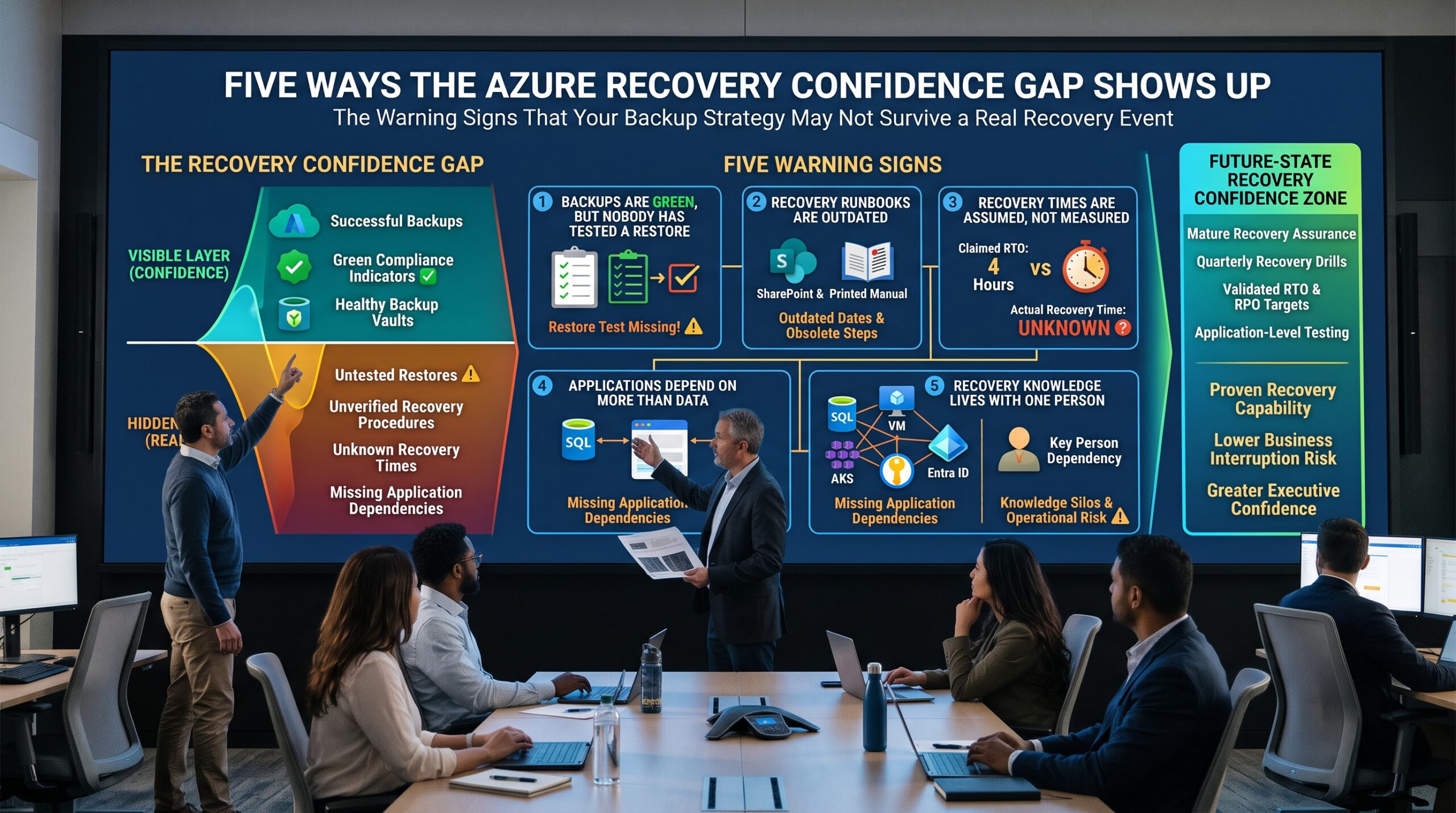
1. Nobody has ever restored the workload end to end
Plenty of teams caught in the Azure recovery confidence gap have restored a single file or a test disk. Far fewer have restored a full production workload into a clean environment and put real users or real test scripts against it. A file restore proves the vault works. It does not prove the application can come back.
2. Restore permissions and identities are untested
This version of the Azure recovery confidence gap is easy to miss. Backups run under service identities and policies that were set up once. Restores need people. If the only person with the right role is on leave, or a role was removed during a tidy-up, the restore stalls before it begins. This ties closely to the problems we cover in our article on the Azure resource ownership gap, where nobody is sure who is responsible for what.
3. Hidden dependencies are not in the plan
Dependencies widen the Azure recovery confidence gap more than anything else. Modern applications rarely stand alone. They lean on Microsoft Entra ID, DNS, key vaults, certificates, private endpoints, firewall rules and shared storage. Restore the virtual machine and forget the DNS record or the Key Vault access policy, and the application still will not work. Dependencies are the number one reason a “successful” restore turns into a very long evening.
4. Recovery targets are guesses, not measurements
Recovery time objective (RTO) is how long you can be down. Recovery point objective (RPO) is how much data you can afford to lose. Many organisations have these numbers written in a policy document, but nobody has timed a real restore against them. When the measured restore time turns out to be six hours and the business promised two, the Azure recovery confidence gap becomes a business problem, not a technical one.
5. The backups themselves are exposed
Attackers know that backups are your safety net, so ransomware crews go after them. If someone with broad permissions can delete a vault or shorten retention without a second approval, your recovery plan is only as strong as that one account. Features such as soft delete, immutable vaults and multi-user authorisation exist to harden this, but they only help if they are switched on and understood. The Australian Cyber Security Centre treats regular, tested backups as a core part of the Essential Eight for good reason. This also overlaps with the themes in our post on the cybersecurity decision gap.
Azure Backup vs Azure Site Recovery: Which One Closes the Gap?
A common misunderstanding is that one service does everything. They solve different problems, and mixing them up widens the Azure recovery confidence gap.
| Azure Backup | Azure Site Recovery | |
| Main purpose | Keep restorable copies of data and VMs over time | Replicate workloads so you can fail over to another region |
| Best for | Accidental deletion, corruption, ransomware, long retention | Region or site outages, planned failover, DR drills |
| Typical test | Restore a VM, disk or files to a clean target | Run a test failover into an isolated network |
| Key question | Can I get my data back from a point in time? | Can my service run somewhere else, quickly? |
Most real environments need both, and both need testing to close the Azure recovery confidence gap. Microsoft describes Site Recovery test failovers as a way to run a disaster recovery drill without affecting production, and the Azure Site Recovery overview on Microsoft Learn explains how drills fit into a wider business continuity plan. Backup answers “can I rewind?” Site Recovery answers “can I move?” Confidence comes from rehearsing both.
A Practical Routine to Close the Azure Recovery Confidence Gap
You do not need a huge programme to shrink the Azure recovery confidence gap. A small, repeatable routine beats a perfect plan that never runs. Here is a simple approach that works for most mid-sized Azure environments.
- Rank your workloads. List your systems and sort them by business impact. Start with the top five. Do not try to test everything in the first month.
- Write down the targets. For each critical workload, record the RTO and RPO the business actually expects. Get a business owner to agree to the numbers.
- Restore into isolation. Restore to a separate resource group or test network so nothing touches production. Azure Backup supports restoring to a new VM or restoring disks, which suits this approach.
- Validate the application, not just the server. Log in, run a transaction, check the database, test the integrations. “The VM powered on” is not a pass mark.
- Time everything. Record how long each step takes, including the waiting, the approvals and the hunting for credentials. This is your real RTO.
- Fix and document. Every surprise is a finding. Update the runbook, adjust the permissions, add the missing dependency and retest.
- Schedule it. Put restore tests in the calendar, quarterly for critical systems and at least yearly for the rest. Treat a skipped test as an open risk.
Microsoft’s documentation also notes that you can perform a restore drill for audit or compliance purposes, which is helpful when you need evidence for an auditor, a board or a cyber insurer.
How to Measure Your Azure Recovery Confidence
Confidence is a feeling. Evidence is a number. These are the measures we suggest tracking so that the Azure recovery confidence gap becomes visible instead of vague.
| Measure | Question it answers | Healthy sign |
| Last successful full restore | When did we last prove it works? | Within the agreed test cycle |
| Measured restore time vs RTO | Is our target realistic? | Measured time sits inside the RTO |
| Application validation pass rate | Did the app work, not just the VM? | Test script passes first time |
| Restore permission coverage | Can more than one person run it? | At least two trained, authorised people |
| Vault protection settings | Can an attacker erase our backups? | Soft delete and immutability enabled |
| Runbook age | Is our documentation current? | Reviewed after every test |
Put these on a one-page Azure recovery confidence dashboard and review them with the same seriousness as your monthly spend. If the numbers are blank, that is useful information too.
Closing the Azure Recovery Confidence Gap in Melbourne, Sydney, Brisbane, Perth, Adelaide and Canberra
Australian organisations face the same Azure recovery confidence gap whether they sit in a CBD tower or a regional office. What changes is the pressure around them: regulated industries, government supply chains and growing expectations from insurers and customers.
- Melbourne: financial services, logistics and healthcare teams often run hybrid estates where dependencies are the biggest risk. See our Azure training in Melbourne.
- Sydney: large enterprises and fintechs need audit-ready evidence that recovery has been tested. Explore Azure certification in Sydney.
- Brisbane: growing mid-market and resources businesses are moving workloads fast and often skip the restore rehearsal. Visit Azure courses in Brisbane.
- Perth: mining, energy and engineering firms with remote sites need recovery plans that cope with limited connectivity. Learn about Azure training in Perth.
- Adelaide: defence, manufacturing and public sector teams benefit from clear, documented recovery runbooks. Check Azure certification in Adelaide.
- Canberra: government agencies and their suppliers work to strict security expectations, so tested recovery is not optional. Read about Azure training in Canberra.
Azure Certifications AU runs instructor-led and live online training across these cities, so your team can learn the skills without leaving their region.
Azure Skills That Help Close the Recovery Gap
Tools do not close the Azure recovery confidence gap on their own. People do. The right training gives your team the vocabulary, the hands-on practice and the confidence to design recovery that works. These courses line up closely with the topics in this article:
- AZ-104 Microsoft Azure Administrator for the people who configure, monitor and restore backups every day.
- AZ-305 Azure Solutions Architect for those designing business continuity, governance and resilient architectures.
- AZ-500 Azure Security Technologies for protecting identities, vaults and data against deletion and ransomware.
- AZ-400 Microsoft DevOps Solutions for teams who want recovery tested through automation and pipelines.
- AZ-900 Azure Fundamentals for managers and non-technical staff who need to understand what “recoverable” really means.
Not sure where to begin closing the Azure recovery confidence gap? Our Azure certification roadmap maps out the path from fundamentals to expert level, and you can browse every course on the certifications page. If recovery is only one piece of a bigger clean-up, you may also like our posts on the Azure governance gap and the managed identity lifecycle gap.
Azure Recovery Confidence Gap: Frequently Asked Questions
What is the Azure recovery confidence gap?
The Azure recovery confidence gap is the difference between believing your Azure workloads can be restored and having proof that they can. Successful backup jobs create the belief. Only a tested restore creates the proof.
Does a successful Azure backup mean I can restore?
Not necessarily. A successful job confirms that a recovery point was created. It does not confirm that the restored workload will start, that your team has the right permissions or that the restore will finish within your target time.
How often should I test Azure restores?
A sensible starting point is quarterly for business-critical systems and at least annually for everything else, plus after any major architecture change. Your own risk appetite, regulators and insurers may require more.
What is the difference between Azure Backup and Azure Site Recovery?
Azure Backup keeps point-in-time copies so you can recover from deletion, corruption or attack. Azure Site Recovery replicates workloads to another region so you can fail over during an outage. Many organisations need both.
How do I run a safe restore test in Azure?
Restore into an isolated resource group or test network, validate the application with a simple test script, record how long each step takes, then clean up the test resources and document what you learned.
What are RTO and RPO?
RTO, or recovery time objective, is the longest outage the business can accept. RPO, or recovery point objective, is the most data loss the business can accept, measured in time. Both should be agreed with business owners and checked against real test results.
Final Thoughts: Turn Green Ticks Into Proof
The Azure recovery confidence gap is not a sign that your team is careless. It is the natural result of automation making backups effortless while restores stay manual, occasional and a little uncomfortable. The fix is not dramatic. Pick your most important workloads, restore them somewhere safe, time the process, fix what breaks and repeat on a schedule.
Do that a few times and the Azure recovery confidence gap starts to shrink. The dashboard stops being a comfort blanket and becomes a record of things you have really proven. That is the point where “we think we can restore” turns into “we know we can.”
Ready to build the skills behind real recovery confidence? Talk to the team at Azure Certifications AU on 1300 649 299 or send an enquiry to find the right Azure course for your people.